查看httpd错误日记:/var/log/httpd/error_log

[Tue Dec 17 18:47:11 2013] [notice] Digest: done
Failed loading /usr/local/lib/ioncube/ioncube_loader_lin_5.3.so: /usr/local/lib/ioncube/ioncube_loader_lin_5.3.so: wrong ELF class: ELFCLASS32
eAccelerator: Could not allocate 67108864 bytes, the maximum size the kernel allows is 33554432 bytes. Lower the amount of memory request or increase the limit in /proc/sys/kernel/shmmax.
PHP Warning: [eAccelerator] Can not create shared memory area in Unknown on line 0
PHP Fatal error: Unable to start eAccelerator module in Unknown on line 0

知道问题就好办了

vi /etc/php.d/eaccelerator.ini

eaccelerator.shm_size 把值改成15(根据自己服务器配置修改)

# 按下 Esc 键退出编辑

:wq

#保存退出

本文内容转载:http://yzpanel.duapp.com/
需要更多详细内容,请访问原作者网站。

安装PHP加速器eAccelerator

yum install make
wget -c http://yzpanel.duapp.com/down/eaccelerator-0.9.6.1.tar.bz2
tar xjf eaccelerator-0.9.6.1.tar.bz2
cd eaccelerator-0.9.6.1
/usr/bin/phpize
./configure -enable-eaccelerator=shared -with-php-config=/usr/bin/php-config
make
make install
cd /
rm -rf eaccelerator-0.9.6.1
rm -rf eaccelerator-0.9.6.1.tar.bz2
mkdir /tmp/eaccelerator
chmod 777 /tmp/eaccelerator

cd /etc/php.d/

wget http://yzpanel.duapp.com/down/eaccelerator/Xen-eaccelerator.ini
mv Xen-eaccelerator.ini eaccelerator.ini

wget http://yzpanel.duapp.com/down/eaccelerator/OPENVZ-eaccelerator.ini
mv OPENVZ-eaccelerator.ini eaccelerator.ini

这一步二选择一即可,根据实际情况选择Xen架构就下载Xen-eaccelerator.ini;OPENVZ架构就下载OPENVZ-eaccelerator.ini

安装 ionCube

cd /
wget -c http://yzpanel.duapp.com/down/ioncube_loaders_lin_x86.zip
unzip ioncube_loaders_lin_x86
mv ioncube /usr/local/lib/
编辑文件/etc/php.ini 添加
zend_extension = "/usr/local/lib/ioncube/ioncube_loader_lin_5.3.so"

安装 Zend Guard Loader

cd /root
wget http://downloads.zend.com/guard/5.5.0/ZendGuardLoader-php-5.3-linux-glibc23-x86_64.tar.gz
sudo mkdir /usr/zend
tar -zxvf ZendGuardLoader-php-5.3-linux-glibc23-x86_64.tar.gz
sudo cp /root/ZendGuardLoader-php-5.3-linux-glibc23-x86_64/php-5.3.x/ZendGuardLoader.so /usr/zend/

编辑文件/etc/php.ini 
在zend_extension = "/usr/local/lib/ioncube/ioncube_loader_lin_5.3.so" 后面添加

zend_extension=/usr/zend/ZendGuardLoader.so
zend_loader.enable=1
zend_loader.disable_licensing=0
zend_loader.obfuscation_level_support=3
zend_loader.license_path=

安装完成之后 service httpd restart 重启httpd服务 然后用php -v查看是否安装成功

ZPanelcp是国外的虚拟主机控制面板,简单易用,界面美观,支持Debian,Ubuntu,CentOS,FreeBSD,Windows系统!官方有一键安装包,默认集成安装ProFTPD、MySQL、phpMyadmin、WebMail、DNS模块。占用内存也比较少,大概100M左右。官方有汉化语言包,还有很多的扩展模块,甚至有计费模块,如果要开展虚拟主机业务都不用买WHMCS了。如果有时间,接下来会接着发一些关于ZPanelcp的文章。

安装 - 环境 CentOS 6.3 64bit

wget http://www.zvps.co.uk/sites/default/files/downloads/centos-6-3/package/installer-x86_64-install.sh.x.tar.gz
tar -xf installer-x86_64-install.sh.x.tar.gz
chmod +x installer-x86_64-install.sh.x
yum install ld-linux.so.2
./installer-x86_64-install.sh.x

以上命令执行完成后会显示如下:

To contine please agree to the GPL license (y/n/q)? y (这里输入y同意许可协议)
Find your timezone from : http://php.net/manual/en/timezones.php e.g Europe/London
Enter Your Time Zone: Asia/Chongqing (这里输入Asia/Chongqing使用亚洲时区)
Install fresh ZPanel server or enter an upgrade version number e.g 10-1-0 :install (这里直接回车)
Enter the FQDN of the server (example: zpanel.yourdomain.com): (主机名默认即可这里直接回车,也可以输入)
Enter the Public (external) IP of the server: 输入IP (公网IP地址输入你的独立IP)
MySQL Password is currently blank, please change it now.
Password you will use for MySQL: 输入phpMyadmin管理密码 (mysql的root密码)
Re-enter the password you will use for MySQL: 再次输入输入phpMyadmin管理密码 (再次输入mysql的root密码)
ZPanel will now install, are you sure (y/n/q)? y (y开始安装)

完成以上操作后会自动进行安装,安装完成后会显示系统管理员密码,保存在 /root/passwords.txt 。之后访问服务器IP即可登入系统,用户是zadmin。

安装ZPanel中文汉化语言包

zppy repo add zpanel-packages.sammottley.co.uk
zppy update
zppy install ZXTS

在Server Admin->Module Admin下开启 在Administrator下打上勾

在Server Admin菜单下就能看到ZXTS了点击进入找到Mandarin -> Install or Update 进入安装下载 提示:Translations was added successfully

在My Account->Choose Language:选择Mandarin->Update Account 这里最好全都修改为你的信息因为如果Email不修改会报错不能保存。

安装K-File Manager文件管理器

zppy repo add rustus.txt-clan.com
zppy update
zppy install kfm

安装好后到模块管理勾选,允许用户使用。

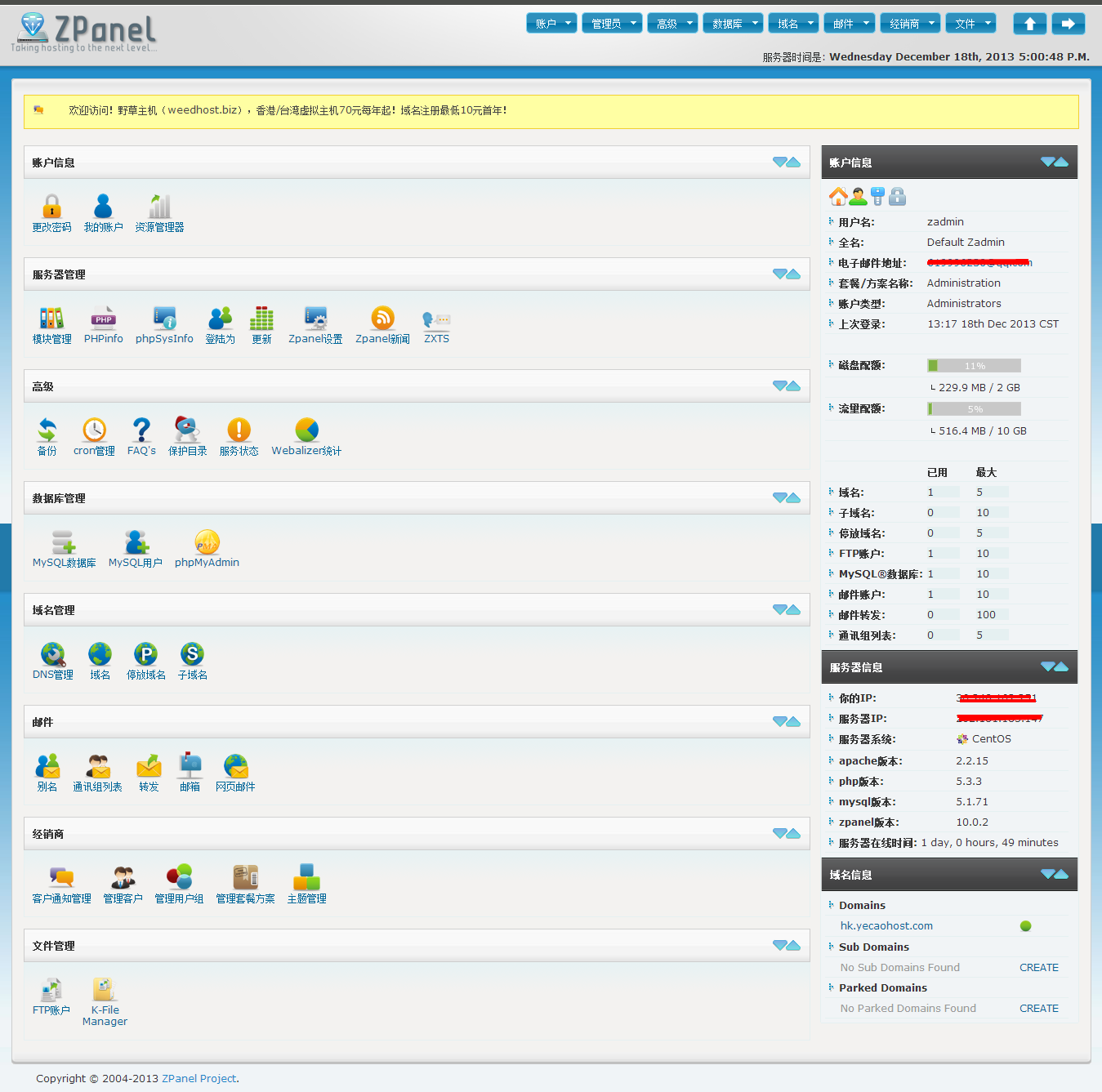
来看看现在的样子吧。
ZPanel

官方网站:http://www.zpanelcp.com/
官方论坛:http://forums.zpanelcp.com/index.php
张永鹏ZPanel的教程:http://yzpanel.duapp.com/

Google资料的时候,无意发现的,效果非常不错!
占用内存小(5M左右),适用多平台(OpenVZ可用)
单线程下载速度提升2-10倍,抽的时候效果更明显。拿了个拉斯维加斯的VPS测试,安装之前,联通6M单线程下载速度在50kb/s左右摇摆,启用后上升到400kb+

效果是不错的!不过作者也说了对于不加速就可以跑满带宽的类型来讲(多线程下载),开启后反而由于多出来的无效流量,导致速度减半。所以对于多线程/高速链路,这个方案是不适合的。

一键安装代码转载于hostloc的@lazyzhu
将如下代码保存为:net_speeder_lazyinstall.sh

#!/bin/sh
 
# Set Linux PATH Environment Variables
PATH=/bin:/sbin:/usr/bin:/usr/sbin:/usr/local/bin:/usr/local/sbin:~/bin
export PATH
 
# Check If You Are Root
if [ $(id -u) != "0" ]; then
    clear
    echo -e "\033[31m Error: You must be root to run this script! \033[0m"
    exit 1
fi
 
if [ $(arch) == x86_64 ]; then
    OSB=x86_64
elif [ $(arch) == i686 ]; then
    OSB=i386
else
    echo "\033[31m Error: Unable to Determine OS Bit. \033[0m"
    exit 1
fi
if egrep -q "5.*" /etc/issue; then
    OST=5
    wget http://dl.fedoraproject.org/pub/epel/5/${OSB}/epel-release-5-4.noarch.rpm
elif egrep -q "6.*" /etc/issue; then
    OST=6
    wget http://dl.fedoraproject.org/pub/epel/6/${OSB}/epel-release-6-8.noarch.rpm
else
    echo "\033[31m Error: Unable to Determine OS Version. \033[0m"
    exit 1
fi
 
rpm -Uvh epel-release*rpm
yum install -y libnet libnet-devel libpcap libpcap-devel gcc
 
wget http://net-speeder.googlecode.com/files/net_speeder-v0.1.tar.gz -O -|tar xz
cd net_speeder
if [ -f /proc/user_beancounters ] || [ -d /proc/bc ]; then
    sh build.sh -DCOOKED
    INTERFACE=venet0
else
    sh build.sh
    INTERFACE=eth0
fi
 
NS_PATH=/usr/local/net_speeder
mkdir -p $NS_PATH
cp -Rf net_speeder $NS_PATH
 
echo -e "\033[36m net_speeder installed. \033[0m"
echo -e "\033[36m Usage: nohup ${NS_PATH}/net_speeder $INTERFACE \"ip\" >/dev/null 2>&1 & \033[0m"

之后执行

sh net_speeder_lazyinstall.sh

项目作者:http://www.snooda.com/read/324
googe项目库:http://code.google.com/p/net-speeder/
本文部分参考: http://www.im1987.com/post/853.html

gm

昨晚上7点多些,朋友提着买的菜、酒、饮料等来到我家。然后一群大老爷们儿就开始风风火火的洗菜做饭,寿星最操劳了,还担任了厨子!做的还是挺好吃的。都是在一起八九年的朋友,平时都比较忙,这次大家抽出空来玩儿,都挺痛快的。大家轮番的灌寿星,然后喝的有些多了开始抽风了,又是跳闷骚舞又是吼歌。喝的那么烂醉,也不知道回去的路上有没闹剧!

纪念剑宇生日 - 20131208

共将创建3个文件,header.php为网页头部,index.php为主体内容,footer.php为底部。

header.php文件内容

<html>
<head>
<title>PHP的require()函数</title>
<style>
p{font-size:24px;color:#FF0000;}
</style>
</head>
<body>

footer.php文件内容

</body>
</html>

index.php主体文件内容

<?php require('header.php'); ?>
<p>Here is the content for this page</p>
<?php require('footer.php'); ?>

浏览器输出内容

<html>
<head>
<title>PHP的require()函数</title>
<style>
p{font-size:24px;color:#FF0000;}
</style>
</head>
<body><p>Here is the content for this page</p>
</body>
</html>

lq

对美好的事物总是有许多的期待与向往,这是驱使人前进的动力。与现实碰撞时,不时可以碰出血花,这可以让人清醒,不至于总是沉醉在幻想中。时间在慢慢流失,没有任何征兆,无法挽留。你无法控制未来,却可以控制现在,该放弃的东西,一定要舍弃,以便可以走的更远,欣赏更多人生沿途的风景。

有些人,有些事,无法留住,就让她去吧。时间会将这些事淡化,直致你想起无法对这件事有任何情感。生活,总是有许多的意外,总是会有许多的不满意,如果总是抱怨,该怎么去享受上帝赐给我们的生命。

如果你的面容还有些幼气,何必去刻意伪装深沉。真正经历了,体验了世事百态,才能有的气质不是你留一把胡茬,憋出严肃,所能装的出来的。

向上吧!去勇敢的面对你的生活。

<?php
$pictures = array('1.jpg','2.jpg','3.jpg','4.jpg','5.jpg','6.jpg','7.jpg','8.jpg','9.jpg','10.jpg','11.jpg','12.jpg');
shuffle($pictures);
?>
<html>
<head>
	<title>Bob's Auto Parts</title>
</head>
<body>

<h1>Bob's Auto Parts</h1>
<div align="center">
<table width=100%>
<tr>
<?php
for ($i=0;$i<3;$i++){
	echo "<td align=\"center\"><img src=\"";
	echo $pictures[$i];
	echo "\"></td>";
	}
?>
</tr>
</table>
</div>
</body>
</html>

以CentOS系统为例,我们经常通过SSH连接到服务器或者VPS作业,编译程序需要比较长的时间,比如LNMP、DA等。如果此时网络突然断开连接,那就折腾了!我们可以安装Screen来预防这种情况,即使和远程服务器断开连接,编译依然会继续进行,我们重新连接后就可以恢复到原来的界面,也许已经安装完成了。

screen -S lnmp #创建一个screen会话,名称为 lnmp

如果提示找不到命令,我们可以运行安装命令:yum install screen

命令:

screen -ls #查看所有screen会话
快捷键 Ctrl+a+d 保存当前的screen会话,返回
exit #退出关闭screen会话
screen -wipe lnmp #删除名称为lnmp的会话
screen -r lnmp #恢复名称为lnmp的会话

一、CentOS 修改IP地址
修改对应网卡的IP地址的配置文件
# vi /etc/sysconfig/network-scripts/ifcfg-eth0
注意:用之前先看一下ifconfig,有的系统中,IP地址没有配在eth0上,配到eth1上,就要进行对应的修改修改以下内容

DEVICE=eth0 #描述网卡对应的设备别名,例如ifcfg-eth0的文件中它为eth0
BOOTPROTO=static #设置网卡获得ip地址的方式,可能的选项为static,dhcp或bootp,分别对应静态指定的 ip地址,通过dhcp协议获得的ip地址,通过bootp协议获得的ip地址
BROADCAST=192.168.0.255 #对应的子网广播地址
HWADDR=00:07:E9:05:E8:B4 #对应的网卡物理地址
IPADDR=12.168.1.2 #如果设置网卡获得 ip地址的方式为静态指定,此字段就指定了网卡对应的ip地址
IPV6INIT=no
IPV6_AUTOCONF=no
NETMASK=255.255.255.0 #网卡对应的网络掩码
NETWORK=192.168.1.0 #网卡对应的网络地址
ONBOOT=yes #系统启动时是否设置此网络接口,设置为yes时,系统启动时激活此设备

二、CentOS 修改网关
修改对应网卡的网关的配置文件
[root@centos]# vi /etc/sysconfig/network
修改以下内容
NETWORKING=yes(表示系统是否使用网络,一般设置为yes。如果设为no,则不能使用网络,而且很多系统服务程序将无法启动)
HOSTNAME=centos(设置本机的主机名,这里设置的主机名要和/etc/hosts中设置的主机名对应)
GATEWAY=192.168.1.1(设置本机连接的网关的IP地址。例如,网关为10.0.0.2)

三、CentOS 修改DNS
修改对应网卡的DNS的配置文件
# vi /etc/resolv.conf
修改以下内容
nameserver 8.8.8.8 #google域名服务器
nameserver 8.8.4.4 #google域名服务器

四、重新启动网络配置
# service network restart

# /etc/init.d/network restart

六、修改 IP 地址
即时生效:
# ifconfig eth0 192.168.0.2 netmask 255.255.255.0
启动生效:
修改 /etc/sysconfig/network-scripts/ifcfg-eth0
修改网关 Default Gateway
即时生效:
# route add default gw 192.168.0.1 dev eth0
启动生效:
修改 /etc/sysconfig/network
修改 DNS
修改/etc/resolv.conf
修改后可即时生效,启动同样有效
修改 hostname
即时生效:
# hostname centos1
启动生效:
修改/etc/sysconfig/network

参考:http://wuhuizhong.iteye.com/blog/780602

1:安装ipmitool

无论是centos,还是ubuntu都可以直接安装,源里都有

yum -y install ipmitool

apt-get -y install ipmitool

2:加载IMPI

http://wiki.adamsweet.org/doku.php?id=ipmi_on_linux

modprobe ipmi_msghandler
modprobe ipmi_devintf
modprobe ipmi_si

3:使用

查看ipmi信息

# ipmitool lan prinet

设置ipmi ipaddress

# ipmitool lan set 1 ipaddr 172.16.124.62

设置掩码

# ipmitool lan set 1 netmask 255.255.0.0

查看用户

# ipmitool user list 1
ID Name Callin Link Auth IPMI Msg Channel Priv Limit
2 ADMIN false false true ADMINISTRATOR

把管理员密码修改成 :chenshake
# ipmitool user set password 2 chenshake

参考:http://yyri.blog.163.com/blog/static/148943951201212364551621/