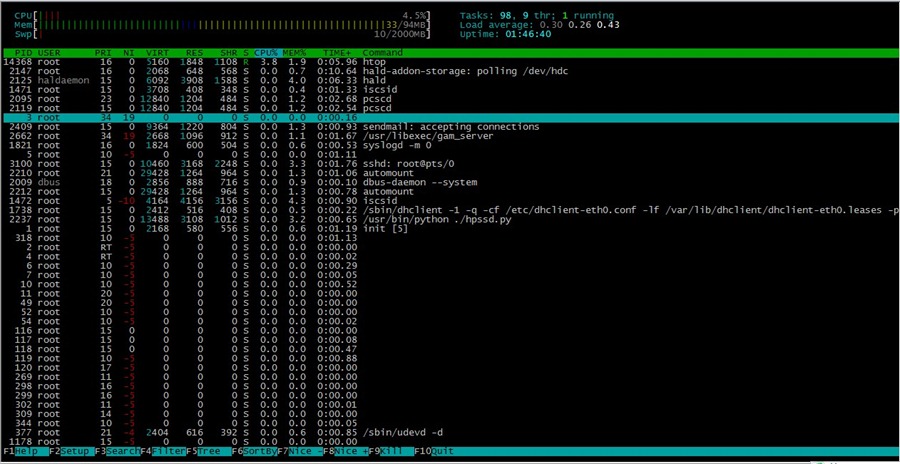
Centos下取代top的进程管理工具 htop
官网 http://htop.sourceforge.net/
安装:
yum install htop
# 如果以上无法安装;请登入官网下载,然后运行以下命令安装
yum install ncurses-devel
tar zxvf htop-*.tar.gz
cd htop-*
./configure
make && make install
#htop
官网 http://htop.sourceforge.net/
安装:
yum install htop
# 如果以上无法安装;请登入官网下载,然后运行以下命令安装
yum install ncurses-devel
tar zxvf htop-*.tar.gz
cd htop-*
./configure
make && make install
#htop
cpulimit 命令的工作原理是为进程预设一个 cpu 占用率门限,并实时监控进程是否超出此门限,若超出则让该进程暂停运行一段时间。cpulimit 使用 SIGSTOP 和 SIGCONT 这两个信号来控制进程。它不会修改进程的 nice 值,而是通过监控进程的 cpu 占用率来做出动态调整。
cpulimit 的优势是可以控制进程的cpu使用率的上限值。但与 nice 相比也有缺点,那就是即使 cpu 是空闲的,进程也不能完全使用整个 cpu 资源。
在 CentOS 上,可以用下面的方法来安装它:
wget -O cpulimit.zip https://github.com/opsengine/cpulimit/archive/master.zip
unzip cpulimit.zip
cd cpulimit-master
make
sudo cp src/cpulimit /usr/bin
上面的命令行,会先从从 GitHub 上将源码下载到本地,然后再解压、编译、并安装到 /usr/bin 目录下。
cpulimit 的使用方式和 nice 命令类似,但是需要用户使用 -l 选项显式地定义进程的 cpu 使用率上限值。举例说明:
cpulimit -l 50 matho-primes 0 9999999999 > /dev/null &
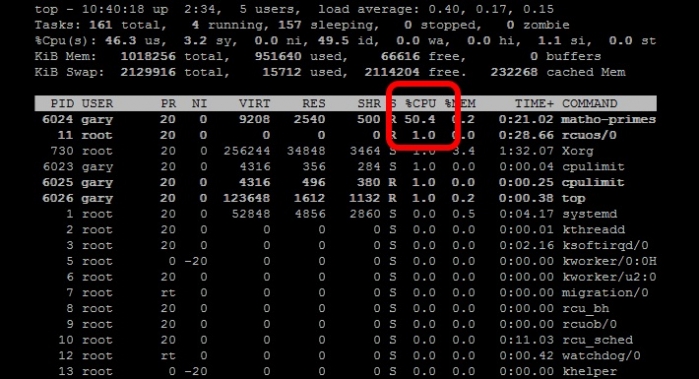
从上面的例子可以看出 matho-primes 只使用了50%的 cpu 资源,剩余的 cpu 时间都在 idle。
cpulimit 其他实例:
cpulimit -e httpd --limit 40 #限制httpd(进程名)的cpu使用率为40%
cpulimit -e /usr/local/bin/httpd --limit 40
cpulimit -p 2960 -l 55 #限制pid为2960的进程的CPU占用为55%
使用帮助:
Usage: cpulimit [OPTIONS...] TARGET
OPTIONS
-l, --limit=N percentage of cpu allowed from 0 to 3200 (required)
-v, --verbose show control statistics
-z, --lazy exit if there is no target process, or if it dies
-i, --include-children limit also the children processes
-h, --help display this help and exit
TARGET must be exactly one of these:
-p, --pid=N pid of the process (implies -z)
-e, --exe=FILE name of the executable program file or path name
COMMAND [ARGS] run this command and limit it (implies -z)
参考:https://linux.cn/article-4742-1.html
functions.php中添加以下代码
// 移除wordpress顶部工具栏css样式
add_action('get_header', 'remove_admin_login_header');
function remove_admin_login_header() {
remove_action('wp_head','_admin_bar_bump_cb');
}
Our PHP-Selector work wtih DirectAdmin only if PHP is running in suphp or fcgi mode. Here is the complete set of commands to enable selector on DA with suphp :
/usr/local/directadmin/custombuild/build set suphp yes
/usr/local/directadmin/custombuild/build set cloudlinux yes
/usr/local/directadmin/custombuild/build update
/usr/local/directadmin/custombuild/build apache
/usr/local/directadmin/custombuild/build php y
/usr/local/directadmin/custombuild/build suphp
/usr/local/directadmin/custombuild/build rewrite_confs
cagefsctl --force-update
cagefsctl --remount-all
Same way for fcgi mode.
http://kb.cloudlinux.com/2014/12/php-selector-and-directadmin/
1) 文件内全部替换:
:%s#abc#123#g (如文件内有#,可用/替换,:%s/abc/123/g)
--注:把abc替换成123
(或者: %s/str1/str2/g 用str2替换文件中所有的str1)
2) 文件内局部替换:
:20,30s#abc#123(如文件内有#,可用/替换,:%s/abc/123/g)
--注:把20行到30行内abc替换成123
当我们启用Suhosin,DA的phpmyadmin会报错,如下:
Server running with Suhosin. Please refer to documentation for possible issues.
是由于权限问题,Suhosin禁止了phpmyadmin部分操作;我们添加例外即可。执行
php -i | grep "Loaded Configuration File"
查看php.ini文件位置,编辑最底下添加
[PATH=/var/www/html/phpMyAdmin]
suhosin.simulation = On
保存后退出重启apache生效即可
1) 创建一个新文件 /etc/yum.repos.d/city-fan.repo
2) 复制下面的到上面文件中:
[CityFan]
name=City Fan Repo
baseurl=http://www.city-fan.org/ftp/contrib/yum-repo/rhel6/x86_64/
enabled=1
gpgcheck=0
3) 操作:
yum clean all
yum install curl
在ThinkPHP里面通过自动验证定义来验证数据的长度是否符合要求,在你的模型类里面添加下面的定义即可:
protected $_validate = array(
array('title','5,100','标题长度不符!',3,'length'), // 验证标题长度
array('phone','11','电话长度不符!',3,'length'), // 验证电话号码长度
);
1、关闭DA监控服务
vi /usr/local/directadmin/data/admin/services.status
把exim和dovecot值改为OFF
2、停止服务和禁止开机启动
service exim stop
chkconfig exim off
service dovecot stop
chkconfig dovecots off
3、损坏(重命名)exim目录
mv /usr/sbin/exim /usr/sbin/exim.old
4、清理邮件队列
cd /var/spool
mv exim exim.old
mkdir -p exim/input
mkdir -p exim/msglog
mkdir -p exim/db
chown -R mail:mail exim
#使用read命令读取一行数据
cat datafile.txt | while read myline
do
echo "LINE:"$myline
done
64位系统需要安装libunwind
wget http://download.savannah.gnu.org/releases/libunwind/libunwind-1.1.tar.gz
tar zxvf libunwind-1.1-alpha.tar.gz
cd libunwind-1.1-alpha/
CFLAGS=-fPIC ./configure
make CFLAGS=-fPIC
make CFLAGS=-fPIC install
安装TCMalloc
wget http://pkgs.fedoraproject.org/repo/pkgs/gperftools/gperftools-2.4.tar.gz/2171cea3bbe053036fb5d5d25176a160/gperftools-2.4.tar.gz
tar zxvf  gperftools-2.4.tar.gz
cd gperftools-2.4/
./configure
make && make install
echo "/usr/local/lib" > /etc/ld.so.conf.d/usr_local_lib.conf
/sbin/ldconfig
MySQL载入
vi /usr/bin/mysqld_safe
#找到 # executing mysqld_safe,在下面加入:
export LD_PRELOAD=/usr/local/lib/libtcmalloc.so
service mysqld restart
#检查是否生效
lsof -n | grep tcmalloc
优化MySQL配置文件
[mysqld]
# WEED 2015-06-06
#default-storage-engine=MyISAM
open_files_limit=60000
innodb_file_per_table=1
local-infile=0
key_buffer_size = 32M
max_allowed_packet = 128M
max_connections = 150
max_user_connections = 50
wait_timeout=30
interactive_timeout=45
connect_timeout=10
tmp-table-size = 256M
max-heap-table-size = 256M
sort_buffer_size = 1M
read_buffer_size = 2M
read_rnd_buffer_size = 8M
myisam_sort_buffer_size = 64M
thread_cache_size = 8
query_cache_size = 32M
innodb-flush-method = O_DIRECT
innodb-log-files-in-group = 2
innodb-flush-log-at-trx-commit = 1
innodb-buffer-pool-size = 64M
#innodb-buffer-pool-instances = 2
innodb_buffer_pool_instances = 1
join_buffer_size = 32M
table_open_cache=64
innodb_buffer_pool_size=2G
innodb_thread_concurrency=8
tmpdir = /dev/shm

[mysqldump]
quick
max_allowed_packet = 16M

[mysql]
no-auto-rehash

[myisamchk]
key_buffer = 256M
sort_buffer_size = 256M
read_buffer = 2M
write_buffer = 2M

[mysqlhotcopy]
interactive-timeout
该处可参考:http://help.directadmin.com/item.php?id=44
Mod_cache可以缓存常见的静态文件,如:css、js等,提升网页加载速度。
安装
cd /usr/local/directadmin/custombuild/configure/ap2
vi configure.apache

在最底部添加

"--enable-cache" \
"--enable-disk-cache" \
"--enable-mem-cache"

cd /usr/local/directadmin/custombuild
./build apache
配置
cd /etc/httpd/conf/extra/    #进入目录
vi httpd-includes.conf    #编辑配置文件

在配置文件中加入以下内容

<IfModule mod_cache.c>
#CacheForceCompletion 100      #缓存文件数(默认不限制)
CacheDefaultExpire 3600        #缓存默认过期时间(秒)
CacheMaxExpire 86400           #缓存最大过期时间(秒)
CacheLastModifiedFactor 0.1    #缓存时间计算公式,详情请查阅网络资料

<IfModule mod_mem_cache.c>
CacheEnable mem /
MCacheSize 512000            #内存缓冲区大小,根据服务器内存大小调整(单位:kb)
MCacheMaxObjectCount 10000   #缓冲区文件数
MCacheMinObjectSize 1        #缓冲区最小文件(单位:kb)
MCacheMaxObjectSize 51200    #缓冲区最大文件(单位:kb)
</IfModule>
</IfModule>