Linux speedtest 网络速度测试
安装
wget https://raw.github.com/sivel/speedtest-cli/master/speedtest_cli.py
chmod a+rx speedtest_cli.py
sudo mv speedtest_cli.py /usr/local/bin/speedtest-cli
sudo chown root:root /usr/local/bin/speedtest-cli
使用
speedtest-cli
安装
wget https://raw.github.com/sivel/speedtest-cli/master/speedtest_cli.py chmod a+rx speedtest_cli.py sudo mv speedtest_cli.py /usr/local/bin/speedtest-cli sudo chown root:root /usr/local/bin/speedtest-cli
使用
speedtest-cli
得知所谓郑苗哥哥不过是以前一个很好的同学,我有一种说不上来的感觉,她为了所谓哥哥多次叫我从她家回去。因为所谓哥哥要来过夜。两年了,将近,今天我才知道。
说不上来的感觉,我越来越不信任郑苗,问我为何总因为一点小事儿多疑,这就是原因吧!如果,同样的事情换作她,我不知道她会怎么样。如果是叫我回家的时候跟我说这件事情,我肯定不会这么久还和她在一起,分手是必然的。
我想起以前林青梅那么骚的一个人,喜欢我我不喜欢她以后和陈炜好,便不再和其他男生有任何瓜葛,即便是以前喜欢过的人。
为什么会隐瞒这么久,有没发生什么,我不知道,我也不愿想。我不敢再信任她,因为我不知道,真的不知道,她还有多少事情瞒着我。
买到二手破车并不可怕,可怕的是车主还有钥匙,没事儿就偷偷开去玩儿,完事儿用的是我的油,坏了是我修。这真是无奈!
我已经把钱花光了,已经在悬崖边上了,我已经没有钱交服务器的月租了。每一次赚到些小钱,我会以赚钱就是为了让爱自己的人开心、幸福为由,花的无节制,最后变成月光族。去年的这个月,我把野草主机交出去了,今年我把野草主机弄回来了,但这个月我仍然面临了与以前同样的生存威胁。我把自己带上了绝路,只能向前,或坠落。
我再一次有了把野草主机交出去的想法,但如果交出去我不是又和以前一样。我想人生不就是为了挑战解决问题,而之后不就是为了迎接新的挑战吗?或许这和游戏有些类似吧,当我们把所有关卡都通关了,把所有的问题都解决完了迎接我们的是空虚,我们的人生或许就画上句号了吧。
When creating a large number of partitions or tables, MySQL may mysteriously stop working and you find this type of error on
/var/lib/mysql/$HOSTNAME.err: [ERROR] /usr/sbin/mysqld: Can't open file: './database/table.frm' (errno: 24)rrno: 24simply means that too many files are open for the given process. There is a read-only mysql variable called open_files_limit that will show how many open files are allowed by the
mysqld:
SHOW VARIABLES LIKE 'open%'
A lot systems set this to something very low, like 1024. Unfortunately, the following will NOT work:
SET open_files_limit=100000
MySQL will respond with:
ERROR 1238 (HY000): Variable 'open_files_limit' is a read only variable
However, it is possible to make a change to /etc/my.cnf. This file may not exist, if not, just create it. Be sure it has the following contents:
[mysqld]
open_files_limit = 100000
Then, be sure to restart mysql:sudo /etc/init.d/mysql restart
Now, SHOW VARIABLES LIKE 'open%' should show 100000. The number you use may be different.
If the tally is using up too much disk I/O, you can slow down the dataskq using the ionice binary, if you have it.
限制 dataskq IO占用率, e编辑:
/etc/cron.d/directadmin_cron
or on FreeBSD:
/etc/crontab
打开文件并找到
* * * * * root /usr/local/directadmin/dataskq
修改为:
* * * * * root /usr/bin/ionice -c2 -n7 /usr/local/directadmin/dataskq
of course, you'll need to ensure that you actually have the /usr/bin/ionice binary. Install it if you don't.
Reload crond (or cron) after you make the change.
For backups, you can have the dataskq insert the ionice command in front of all tar, zip and unzip commands:
http://www.directadmin.com/features.php?id=1423
CentOS 安装 ionice:
yum install util-linux
Debian:
apt-get install util-linux
相关官方文档:http://help.directadmin.com/item.php?id=525
centos下当screen无法正常-R恢复exit退出的时候我们可以直接删除该任务
cd /var/run/screen/S-root/
ls -ls
rm -rf name.name
centos6,运行locate命令,控制台提示
locate: can not stat () `/var/lib/mlocate/mlocate.db': No such file or directory
如果出现此错误,请执行
updatedb
这个命令要花一小点时间,然后再执行locate操作就行了
原文:http://blog.csdn.net/w13770269691/article/details/6987384
Axel 是 Linux 下一个不错的HTTP/FTP高速下载工具。支持多线程下载、断点续传,且可以从多个地址或者从一个地址的多个连接来下载同一个文件。适合网速不给力时多线程下载提高下载速度。比如在国内VPS或服务器上下载lnmp一键安装包用Axel就比wget快。
CentOS安装Axel:
目前yum源上没有Axel,我们可以到http://pkgs.repoforge.org/axel/下载rpm包安装。
32位CentOS执行下面命令:
wget -c http://pkgs.repoforge.org/axel/axel-2.4-1.el5.rf.i386.rpm
rpm -ivh axel-2.4-1.el5.rf.i386.rpm
64位CentOS执行下面命令:
wget -c http://pkgs.repoforge.org/axel/axel-2.4-1.el5.rf.x86_64.rpm
rpm -ivh axel-2.4-1.el5.rf.x86_64.rpm
Debian/Ubuntu安装Axel:
apt-get install axel
Axel命令使用方法:
axel 参数 文件下载地址
可选参数:
-n 指定线程数
-o 指定另存为目录
-s 指定每秒的最大比特数
-q 静默模式
如从Diahosting下载lnmp安装包指定10个线程,存到/tmp/:axel -n 10 -o /tmp/ http://soft.vpser.net/lnmp/lnmp0.7-full.tar.gz
如果下载过程中下载中断可以再执行下载命令即可恢复上次的下载进度。
原文:http://www.vpser.net/manage/axel.html
If you see the error
/usr/local/lib/libz.so.1: no version information available (required by python)
it has to do with the version of libz installed. The reason for the current version has to do with the version of libz that libxml2 requires. A newer version of both will resolve the issue, but due to many reported issues with this update, we reverted to the older version of libz and libxml2. Note that the warning is not going to hurt anything, so it can be ignored.
We do not recommend using the options below.
If you still wish to update libz and libxml2 to their newer versions to avoid the message, type:
cd /usr/local/directadmin/custombuild
./build update
./build set new_zlib yes
./build update_data
./build zlib
./build libxml2
./build php n
EPEL(Extra Packages for Enterprise Linux) 是由 Fedora 社区打造,为 RHEL 及衍生发行版如 CentOS等提供高质量软件包的项目。装上了 EPEL,就像在 Fedora 上一样,可以通过 yum install 软件包名,即可安装很多以前需要编译安装的软件、常用的软件或一些比较流行的软件,比如现在流行的nginx, openvpn等等,都可以使用EPEL很方便的安装更新。
安装EPEL源
CentOS/RHEL 5 :
rpm -Uvh https://dl.fedoraproject.org/pub/epel/epel-release-latest-5.noarch.rpm
CentOS/RHEL 6 :
rpm -Uvh https://dl.fedoraproject.org/pub/epel/epel-release-latest-6.noarch.rpm
CentOS/RHEL 7 :
rpm -Uvh https://dl.fedoraproject.org/pub/epel/epel-release-latest-7.noarch.rpm
Ok,安装完毕。
使用EPEL源安装软件
现在就可以执行:yum install 软件包名进行安装了,nginx、openvpn、htop、ncdu等等一些常用的软件都灰常简单的装上了。
原文:http://www.vpser.net/manage/centos-rhel-linux-third-party-source-epel.html
郑苗学校运动会,她扮新娘,和另外一个男生,新郎。运动会开幕,音乐响起,她挽着新郎的手,微笑着洋溢着幸福在全校师生面前徐徐走过,然后新郎半跪求婚。如此,一副感人至深的场面,赢得全校人们的赞许,得了最佳表演奖,并将登上校报。
本该为她兴喜,但此刻我心却甚是悲凉,回想起她第一个男友不是我,初吻不是我,第一次不是我,第一胎不是我,现今第一次穿婚纱为的仍不是我!
寒夜悲月,冬风肆虐,万物寂静,独行归路,寒意逼人。我早该想到,她曾征询我意见,我不以为然,可不曾想真见到了如此画面,我却无法安然!
可奈何事已如此,无法改变。我的心里都是伤痛,如若初见,我定是不愿与她相恋。我无法坦然面对,无法安心放下,生怕一次又一次的伤害,我已伤痕累累,无力承受。
我取出了钱包里的照片反过来锁在柜子里,取下手上的戒指放于盒中,删除往日留言和痕迹,我不愿不想面对昔日温情。离别吧!在这寒冷的冬季,让时间抚平创伤,让时间淡忘深情。
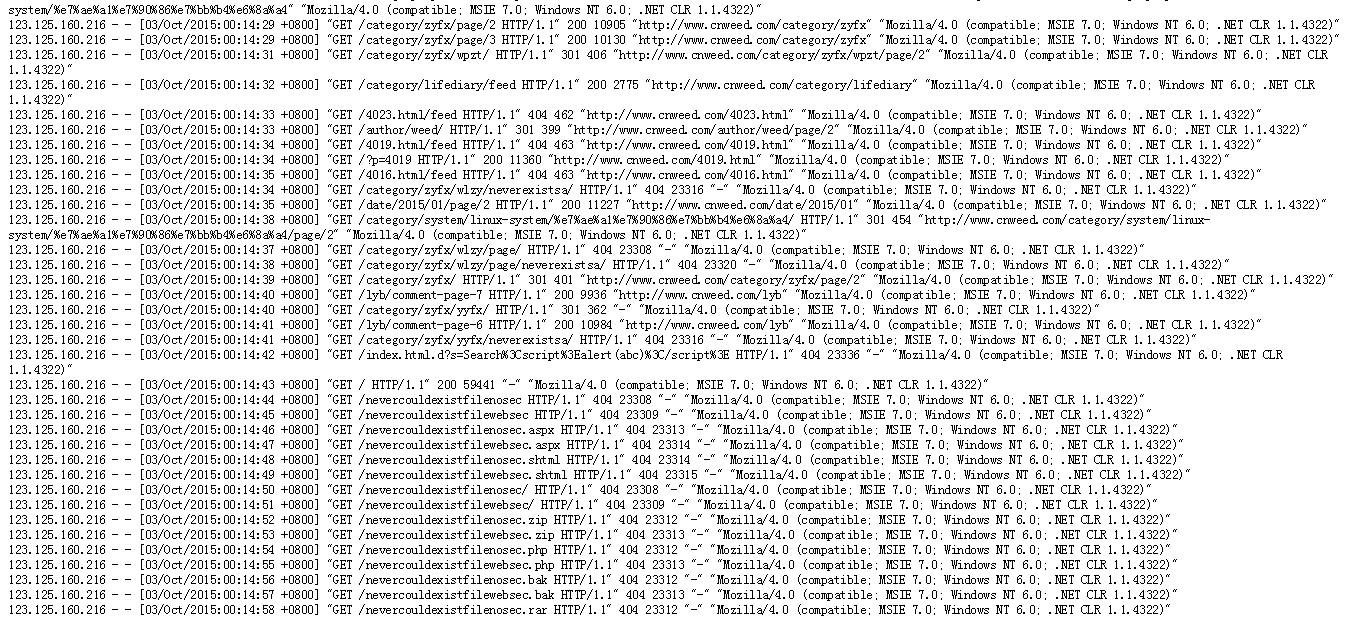
如图,有时候我们检查Apache日记的时候会发现大量这样的单IP或多IP在短时间内请求大量不存在的目录/文件,Apache返回404状态,这不仅消耗服务器资源还可能有安全隐患。我们可以通过CSF防火墙解决,CSF可以根据返回状态次数来屏蔽请求IP访问,相关设置和说明:
# This option will keep track of the number of "File does not exist" errors in
# HTACCESS_LOG. If the number of hits is more than LF_APACHE_404 in LF_INTERVAL
# seconds then the IP address will be blocked
#
# Care should be used with this option as it could generate many
# false-positives, especially Search Bots (use csf.rignore to ignore such bots)
# so only use this option if you know you are under this type of attack
#
# A sensible setting for this would be quite high, perhaps 200
#
# To disable set to "0"
LF_APACHE_404 = "200"
# If this option is set to 1 the blocks will be permanent
# If this option is > 1, the blocks will be temporary for the specified number
# of seconds
LF_APACHE_404_PERM = "3600"